







Minecraft has 13 trading villager professions, each linked to a specific job-site block. A lectern creates a librarian, a composter creates a farmer, and a smithing table creates a toolsmith. To choose a villager's profession, start with an adult who can work and has never completed a trade.
This guide covers all 13 jobs, their workstations and practical uses. It also explains how to assign them, when they become permanent, and what to check when a villager claims the wrong station or stops restocking. Plan your trading hall before filling your base with workstations nobody uses.
Scope: vanilla Minecraft Java and Bedrock, researched on October 10, 2026 using official documentation and release notes. We separate normal trading from the Villager Trade Rebalance experiment. Examples describe useful trade categories, not a guaranteed inventory for every villager. The diagrams are educational illustrations; the individual profession portraits come from Minecraft.net. We do not claim to have tested these setups in-game.
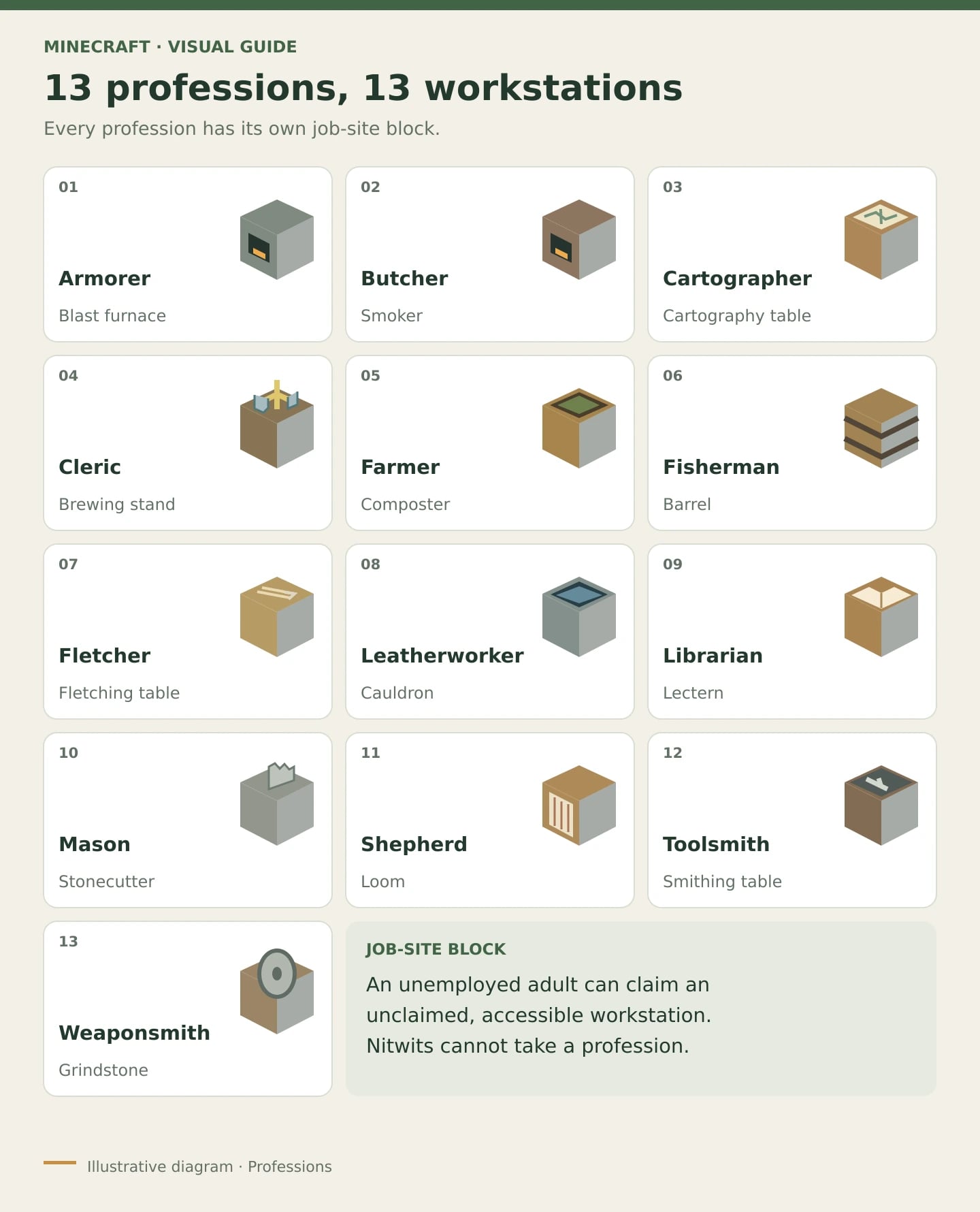
All 13 villager jobs and workstation blocks
Use this table as your workstation shopping list. A regular furnace cannot replace a blast furnace or smoker, and a crafting table cannot replace a smithing table. Each profession needs the correct kind of block.
| Profession | Job-site block | Main use |
|---|---|---|
| Armorer | Blast furnace | Armor and defensive equipment. |
| Butcher | Smoker | Sell raw meat for emeralds; buy food from the villager. |
| Cartographer | Cartography table | Explorer maps and related supplies. |
| Cleric | Brewing stand | Rotten flesh, materials and ender pearls. |
| Farmer | Composter | Crops, food and emeralds. |
| Fisherman | Barrel | Fish and fishing equipment. |
| Fletcher | Fletching table | Sticks, arrows and ranged weapons. |
| Leatherworker | Cauldron | Leather and leather equipment. |
| Librarian | Lectern | Enchanted books and library supplies. |
| Mason | Stonecutter | Stone, clay and building blocks. |
| Shepherd | Loom | Wool, dyes and textile decoration. |
| Toolsmith | Smithing table | Mining and building tools. |
| Weaponsmith | Grindstone | Swords and axes for combat. |
The workstation determines the job, but villagers with the same profession do not necessarily offer identical trades. Some unlock at higher levels, and trade pools can differ between Java, Bedrock, releases and world settings. Open the villager's trading menu to check what that individual actually buys and sells.
Unemployed villagers, nitwits, babies and wandering traders
- Unemployed: an eligible adult without a profession can claim an available workstation and take a job.
- Nitwit: the distinctive green-robed villager cannot take a profession or trade. It is not simply an unemployed adult waiting for a lectern.
- Baby: cannot work or trade yet. Let it grow into an adult before assigning a profession.
- Wandering trader: a separate merchant with its own trades. Placing a workstation nearby will not turn it into a librarian.
This explains why some lists describe 15 villager types by adding unemployed villagers and nitwits. Here, we count 13 trading professions. Minecraft's official jobs roundup also includes the nitwit as a humorous category, rather than an extra trading profession.
What each villager does and when to choose it
Reading the images: each portrait shows one visual example of the profession; base clothing can vary by biome. The workstation is named in the heading and caption, even when it is not pictured. Images by Mojang Studios/Microsoft, from Villager jobs ranked on Minecraft.net. This is an independent Teramont guide, not an official Minecraft publication, and it is not approved by Mojang or Microsoft.
1. Armorer: blast furnace

An armorer specializes in armor. It is useful for preparing spare equipment for expeditions or outfitting several players. Progression can unlock higher-quality armor, including enchanted diamond pieces. Check the trades as they unlock: placing a blast furnace does not immediately give you access to a complete diamond set.
2. Butcher: smoker

A butcher fits a base with surplus animal-farm products. Its trades can turn certain raw meats into emeralds and provide food. The smoker is its workstation, as the official block guide confirms. Check which meats your butcher accepts before committing a large stockpile.
3. Cartographer: cartography table

Choose a cartographer when you want an exploration goal. Its maps can point toward structures and other destinations available in your version. Read the map's name before buying and pack for the trip. The block also has separate player-facing features covered in the cartography table guide.
4. Cleric: brewing stand

A cleric is useful when rotten flesh is piling up or when you want trading routes to materials such as lapis lazuli, glowstone and ender pearls. It does not act as an automatic potion-brewing service. A brewing stand workstation does not mean the villager will prepare any potion recipe you need.
5. Farmer: composter

A farmer is a sensible early choice if you already grow food. Its buying offers can give you an outlet for crops, while its selling offers can supply expeditions; golden carrots are a notable product as you progress. Check your farmer's actual crop purchases before organizing a farm around them.
6. Fisherman: barrel

A fisherman deals in fish and fishing-related equipment, including rods in certain offers. Its workstation is a barrel, even if you placed that barrel as decorative storage. If new villagers keep becoming fishermen unexpectedly, inspect nearby storage before assuming your lectern is broken.
7. Fletcher: fletching table
Build a village your whole group can share
Bring your farms and trading hall into a shared world. Explore Teramont Minecraft hosting and choose an option that fits your group.


A fletcher is handy when you have renewable wood and need ammunition or ranged weapons. Buying sticks is a familiar offer, but check the trading menu before dedicating your entire wood supply to it. The fletching table provides the job; interact with the villager to trade.
8. Leatherworker: cauldron

A leatherworker focuses on leather and leather equipment. It can help use surplus resources or support decorative projects, although it is rarely your first priority when you specifically want diamond armor. Its workstation is a cauldron, rather than the cleric's brewing stand.
9. Librarian: lectern

A librarian is valuable for finding enchanted books. Inspect the enchantment and its level before keeping the villager by completing a trade. A lectern does not guarantee Mending. Be careful with older catalogs, too: the Java 26.1 release notes removed name tags from master librarians and moved them to the wandering trader.
10. Mason: stonecutter

A mason supports builders who use stone, clay and decorative blocks. Plan its purchases and sales around your build: a repeatable material supply can be more useful than emeralds with nothing planned for them. A stonecutter assigns the profession and separately lets players make block variants.
11. Shepherd: loom

A shepherd complements sheep farms and builds using wool, dyes and textile decorations. Check the specific colors and materials in its offers; one shepherd will not necessarily buy every type of wool you produce. For a decorative base, several complementary traders may be more useful than several copies of the same offers.
12. Toolsmith: smithing table

Look here for mining and building tools, such as pickaxes, shovels and axes, depending on level and available trades. A toolsmith helps organize replacement equipment. The smithing table has separate equipment functions for players; those functions do not mean its villager sells netherite upgrades.
13. Weaponsmith: grindstone

A weaponsmith focuses on swords and axes, including high-level enchanted options. Keep it distinct from the toolsmith and armorer: each uses a different workstation. To prepare equipment for a group, split those responsibilities across the three professions instead of placing several smithing tables and expecting every equipment category.
A practical starting lineup
Start with a farmer or fletcher if you already produce what it buys. Add a librarian to look for enchantments, followed by an armorer or smith for replacement gear. Expand with masons, shepherds or cartographers as your plans develop. This is an organizational suggestion, not a universal ranking: the best job depends on your resources and goals.
How to assign or change a villager's profession
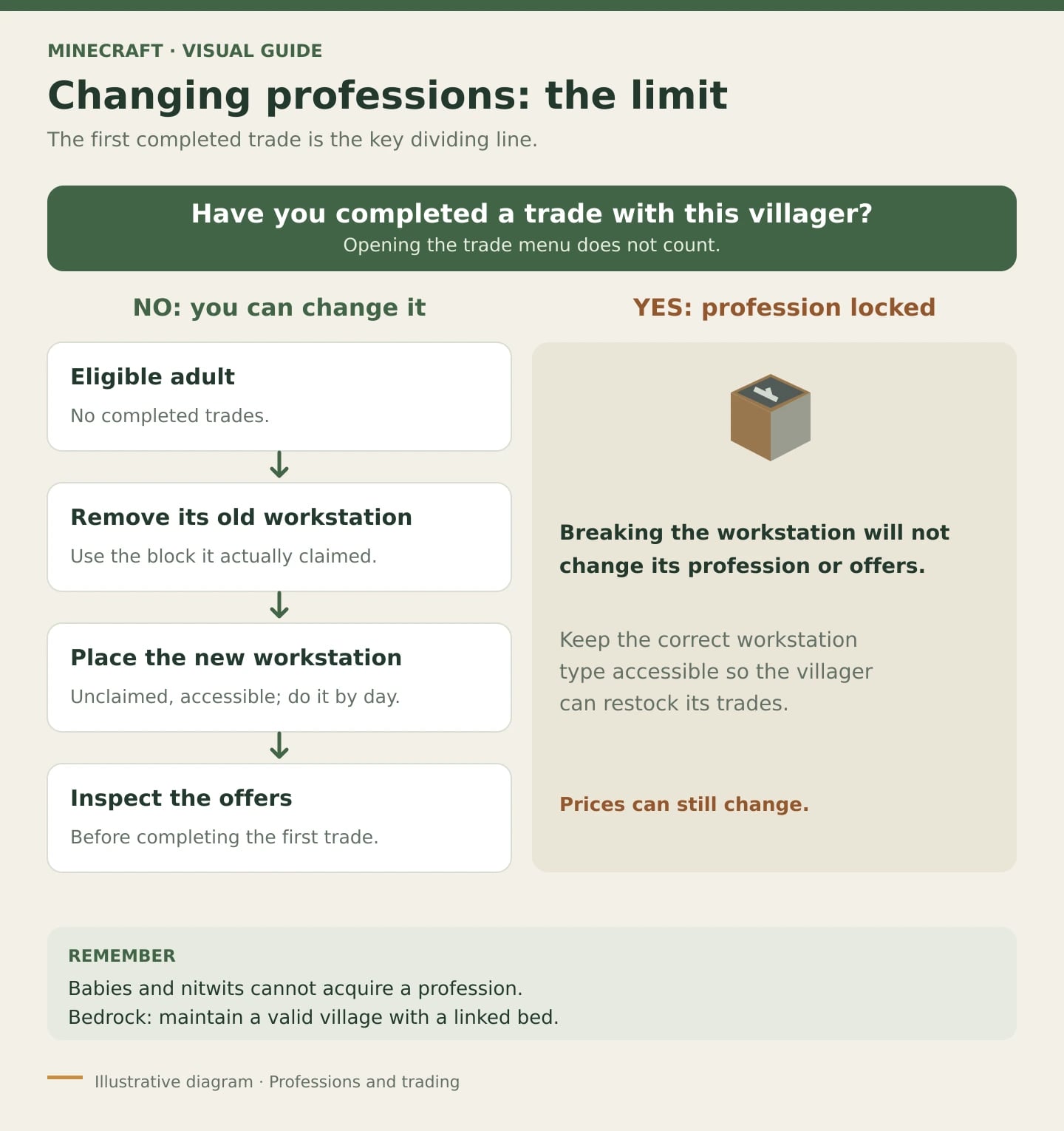
- Choose an eligible adult. It must be able to work and must never have completed a trade with you or another player.
- Prepare a safe space. Protect the villager and workstation, leaving clear access. Handle one villager at a time so you can identify which block it claims.
- If it has an unlocked job, remove its linked workstation. Wait for it to lose the profession. Breaking a similar but unclaimed block will not help.
- Place an available workstation for the new job. Do this during the day and watch the villager. If another villager claims it, resolve that connection before continuing.
- Open the menu and inspect the offers. Looking does not lock them. To try again, remove and replace the workstation before completing any trade.
- Complete a trade when you decide to keep it. The profession is now locked. Keep a workstation of that same type available for future work.
Important: the first completed trade locks the profession and preserves offers, but does not freeze prices. It also does not reveal every higher-level trade immediately. In Java 26.1, Mojang changed trade generation to random sequences determined by the world seed. You can still reroll an untraded villager, but cannot promise a particular result after a set number of attempts.
Need more adults to expand? See how to breed villagers in Java and Bedrock. Breeding and assigning jobs are separate processes: extra workstations do not create babies by themselves.
Levels, prices and restocking
The five levels are Novice, Apprentice, Journeyman, Expert and Master. Trading gives the villager experience and unlocks more offers. Check its progress bar and rank in the trading menu; moving it into a different room will not level it up.
An exhausted offer can become available again when the villager works at its workstation. The general rule is up to two restocks per in-game day, not two guaranteed restocks when the workstation is inaccessible. Mojang documented this connection between working and restocking in Village & Pillage.
- Java: the villager must be able to work at its claimed workstation. A bed is not a requirement for restocking.
- Bedrock: keep a valid village established through a bed linked to a villager, as well as the workstation. This does not mean every trader must sleep in its own bed. Village-dependent workstation behavior is recorded in Mojang's issue tracker.
- Both: check during daytime working hours and keep the area simulated. Waiting far away is not a reliable restocking test.
Prices can change with demand and other game modifiers. A retained trade may become more expensive while still offering the same item. Avoid planning your economy around permanently minimal prices or an identical number of uses for every offer.
Why a villager will not take a job or restock
- It refuses to change jobs: check whether anyone has already traded with it. If so, use another adult for the new profession.
- It chooses a different job: inspect nearby workstations, including storage barrels and blocks behind walls. Place and verify one station at a time.
- It ignores the block: check that the station is unclaimed, is the correct block and can be used by that villager. In Bedrock, also check the village connection.
- An offer has a cross over it: wait for daytime work and check the assigned workstation. Adding random stations can make the problem harder to diagnose.
- It only fails on a server: check the version, plugins, mods, data packs or add-ons, and simulation settings. A hall designed for another edition does not prove your setup should work.
Normal trades versus Villager Trade Rebalance
Do not apply an experimental trading guide to a world where the experiment is disabled. The rebalance changes certain trades, including book pools tied to villager biome types. Its introduction notes distinguish it from normal worlds, and Java 26.1 still explicitly describes it as an experiment.
Under normal rules, looking for Mending does not require assuming the experimental swamp-librarian restriction. That still does not guarantee the book on your first librarian. Before investing time in moving villagers or rerolling offers, check the edition, version and world experiments. On modified servers, also ask whether the trade tables have been customized.
Frequently asked questions
Does every crafting block create a villager job?
No. Only the corresponding job-site blocks assign these professions. An anvil, enchanting table or crafting table does not create an additional vanilla profession.
Can I change a librarian I have already traded with?
Not through ordinary workstation changes. It keeps its profession after its lectern is removed. Restore an accessible lectern so it can work, and use another villager if you want a different job.
Do I need a bell to assign professions?
No. A bell cannot replace workstations or unlock jobs. When troubleshooting, check eligibility, workstation ownership and access first, along with village and bed connections in Bedrock.
Which villager sells netherite?
None of these professions sells netherite equipment through normal vanilla trades. The smithing table's player-facing functions are separate from the toolsmith's inventory.
Follow this order: choose the job, verify its linked workstation, inspect the offers, then trade. A small hall that restocks correctly is a better starting point than thirteen unverified stations.