







DNS is the system that lets people use memorable names such as teramont.net instead of memorizing IP addresses. Every time you open a website, send an email, or connect to many Internet services, DNS helps locate the correct server.
The short explanation is simple: DNS works like the Internet's contact list. You search for a name, and the system finds the corresponding address. It looks simple from the outside, but distributed servers, caches, and several record types work behind the scenes.
What does DNS mean?
DNS stands for Domain Name System. It is a hierarchical, distributed system that associates domain names with information used to locate services: IPv4 addresses, IPv6 addresses, mail servers, aliases, verification data, and more.
The original standard, described in the RFC Editor's RFC 1034, divides DNS into three major elements: the domain name space and resource records, name servers, and resolvers that perform queries.
DNS explained with an everyday example
Think about your phone's contact list. To call someone, you select “Ana”; you do not type the full number every time. Your phone stores the relationship between the name and the number.
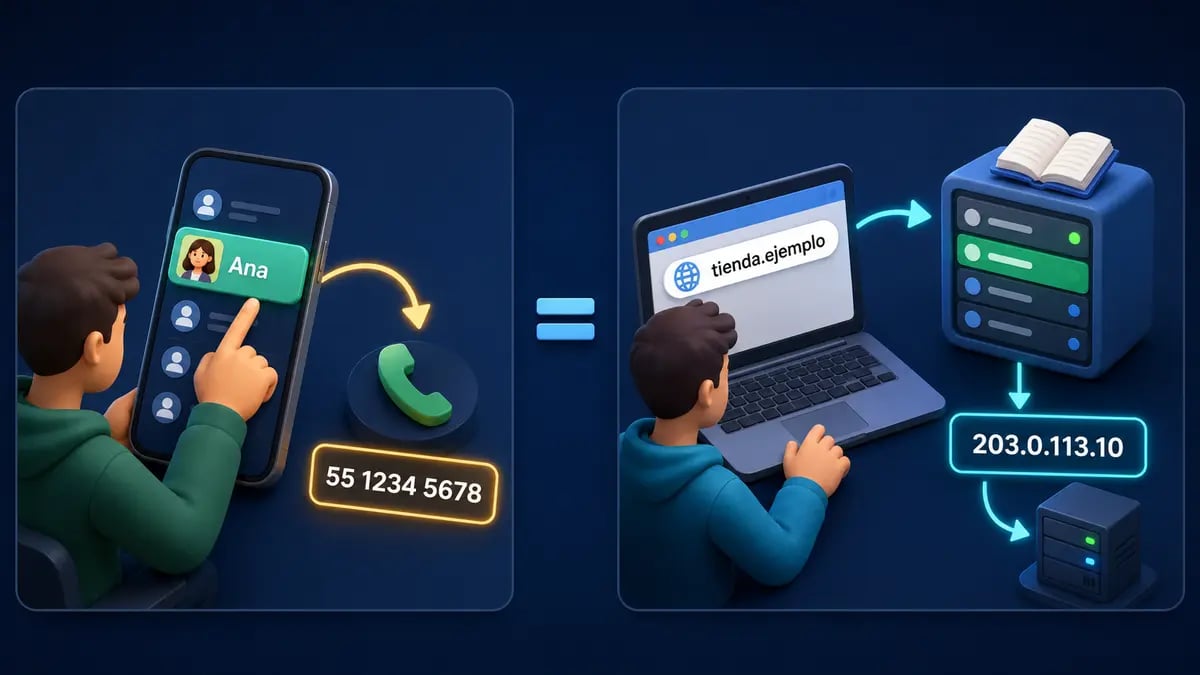
DNS does something similar: it receives a human-friendly name and finds the address computers need.
When you type shop.example, your device needs to discover an address such as 203.0.113.10. Once it has the address, the browser can connect to the server and request the page. The address used here belongs to a documentation range and does not point to a real server.
Domain, DNS, IP address, URL, and hosting are not the same
Although they often appear together, each concept has a different purpose:
- Domain: the registered name, such as
example.com. - DNS: the system that publishes and looks up information related to that domain.
- IP address: the numeric address of a device or service on a network.
- URL: the complete address of a resource, such as
https://example.com/guides/dns. - Hosting or VPS: the server where the website, API, database, or another application runs.
Buying a domain does not automatically create a website. You also need somewhere to host it and DNS records that explain how to reach that service.
How does a DNS query work step by step?
For the user, it happens in milliseconds and usually goes unnoticed. In a query that is not already cached, the simplified journey is:
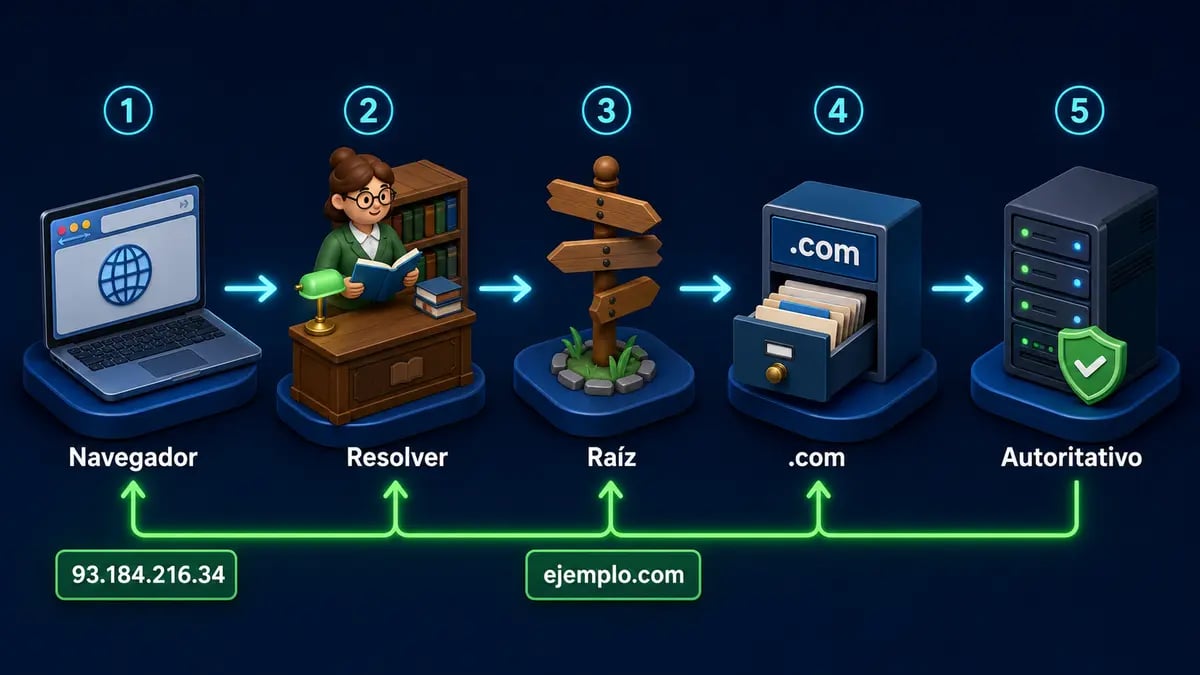
The resolver asks different layers of DNS until it reaches the authoritative server that knows the answer.
- The browser asks: the user enters a domain and the browser checks whether it already knows the answer.
- A recursive resolver is queried: it usually belongs to the Internet provider or a public service. Its job is to find the complete answer.
- The root server guides the search: it does not necessarily return the final IP; it points toward the relevant extension.
- The TLD server responds: for a domain ending in
.com, it identifies the domain's authoritative name servers. - The authoritative server returns the record: it provides the requested IP address or other data.
- The resolver caches the answer: it sends the result to the browser and temporarily retains it.
- The browser connects to the server: with the resolved IP, it starts the HTTP or HTTPS connection.
Google Public DNS documentation clearly distinguishes a recursive resolver from authoritative DNS hosting: the former finds answers for users, while the latter publishes a domain's official records.
What are DNS cache and TTL?
Repeating the full journey on every visit would be inefficient. Browsers, operating systems, and recursive resolvers therefore store answers temporarily in a cache.
TTL means Time To Live. It specifies how many seconds a record may be retained before it must be queried again. With a TTL of 3600, an answer may remain in certain caches for up to one hour.
This explains so-called “DNS propagation.” After you change an IP address, some users may see the new server while others continue using an older cached answer. There is no button that can simultaneously erase every cache on the Internet.
An everyday cache example
Imagine a coffee shop changes address. Someone who checks today's directory reaches the new location; someone holding a photo of the previous directory may visit the old one. TTL controls how long that “photo” may be considered valid.
Common DNS record types
Connect your domain to a VPS you control
Host your website, API, or service on a VPS with dedicated resources, root access, and DDoS protection. Then point your DNS records to its IP address.

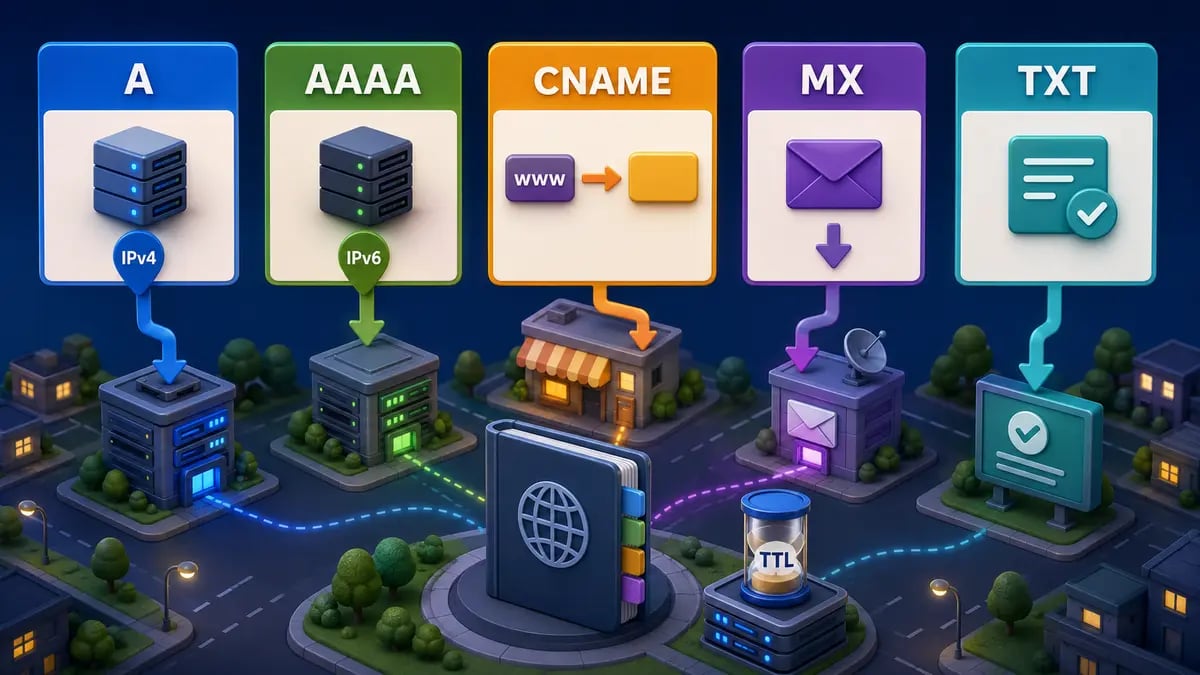
Each record type answers a different question: where a website lives, which server receives mail, or how a domain is verified.
A record
Associates a name with an IPv4 address. It is commonly used to point a domain or subdomain to a VPS IPv4 address.
example.com. 3600 IN A 203.0.113.10AAAA record
Performs the same role as an A record, but uses IPv6.
example.com. 3600 IN AAAA 2001:db8::10CNAME record
Creates an alias that points to another name. For example, www.example.com can be an alias of example.com. It is not an HTTP redirect; it acts during DNS resolution.
MX record
Identifies the servers that receive email for a domain. It includes a priority: lower values are preferred.
TXT record
Stores text associated with a domain. It is frequently used for verification and email policies such as SPF, DKIM, and DMARC. A TXT record does not execute code; it only publishes information.
NS, CAA, PTR, and SRV records
- NS: delegates a zone to its authoritative name servers.
- CAA: states which certificate authorities may issue certificates for the domain.
- PTR: performs reverse resolution by associating an IP with a name. For a VPS, it is usually configured through the provider because the reverse zone belongs to the IP owner.
- SRV: publishes the location, port, and priority of specific services.
Example: connecting a domain to a VPS
Suppose your VPS has the IPv4 address 203.0.113.10 and you want to host a website at example.com. A basic setup could look like this:
@      A       203.0.113.10
www    CNAME   example.com.
api    A       203.0.113.10
The @ symbol commonly represents the root domain in a DNS panel. Exact syntax varies by provider. These records only identify the destination; you still need to configure the web server, virtual host, firewall, and TLS certificate on the VPS.
If you want to host email, do not add a random MX record. You need a correctly configured mail server, authentication records, consistent reverse DNS, and a healthy IP reputation.
How is DNS related to a VPS?
A VPS can work using only its IP address, but a domain simplifies access and lets you organize services with subdomains:
www.example.comfor a website.api.example.comfor an API.panel.example.comfor a private panel.status.example.comfor a status page.mail.example.comfor mail infrastructure.
This separation lets you move services, change IP addresses, or distribute applications without forcing users to learn new addresses. You update only the relevant DNS records.
For a practical application example, our guide to install OpenClaw on a VPS shows a case where a domain and HTTPS help expose a service cleanly. You can also read the Astro deployment guide for VPS.
Common DNS errors and what they mean
- The domain does not resolve: the record may be missing, the name servers may be incorrect, or the wrong zone may be answering.
- It opens the previous server: a cached answer may still be active or the TTL has not expired.
- The website works but email does not: MX or TXT records may be incomplete; web and email rely on different records.
- A subdomain fails: it usually needs an explicit record unless an appropriate wildcard exists.
- The domain resolves but the website does not open: DNS completed its job; the issue may be the firewall, Nginx, Apache, TLS, or the application.
- It works on one network but not another: different resolvers may hold different cached answers during a change.
Does switching to 1.1.1.1 or 8.8.8.8 change my domain records?
No. Those addresses belong to public resolvers that devices can use to look up answers. Changing the resolver on your computer does not modify a domain's authoritative records or replace the panel where you manage its DNS zone.
This distinction prevents a common misunderstanding: resolving DNS and hosting DNS are different functions. A resolver such as Google Public DNS finds information; an authoritative provider publishes official information.
DNS security and privacy
Traditional DNS was designed in a different era and has gained extensions that improve its security:
- DNSSEC: uses signatures to validate that an authoritative answer was not altered. It does not encrypt the query.
- DNS over HTTPS (DoH) and DNS over TLS (DoT): encrypt transport between the device and a compatible resolver. They do not replace DNSSEC.
- Redundancy: multiple authoritative servers reduce the risk that one failure makes the domain impossible to resolve.
- Account protection: registrar and DNS provider accounts should use unique passwords and multifactor authentication.
Avoid running an unrestricted open recursive resolver on your own server; misconfigured resolvers can be abused in DDoS amplification attacks.
Why use a VPS for your next project?
Understanding DNS helps you get more value from a server. With a Teramont Host VPS, you can deploy websites, APIs, panels, databases, and applications with root access, Linux or Windows, DDoS protection, and allocated resources.
Once the VPS is deployed, point your domain using A and AAAA records, create subdomains for each service, and enable HTTPS. Your users get clear names while you retain control of the infrastructure.
Ready to put this into practice? Explore Teramont VPS plans, choose the resources your application needs, and connect your domain when the server is ready.
Frequently asked questions about DNS
Are DNS and the Internet the same thing?
No. The Internet can carry traffic using IP addresses without DNS, but it would be much less convenient for people. DNS is one of the systems that makes the Internet easier to use.
How long does a DNS change take?
It depends on the previous TTL, caches, and the provider. Some changes appear within minutes, while some users may retain the previous answer for several hours.
Does DNS host my website?
No. DNS points to the service's location. Files and applications run on hosting, a VPS, a platform, or another server.
Can several domains use the same IP address?
Yes. A web server can host several domains and decide which site to serve based on the requested name. Configure every domain in DNS and on the server.
Do I need DNS to access a VPS over SSH?
It is not required: you can connect directly to the IP. However, a name such as ssh.example.com is easier to remember and lets you change the IP without changing the name administrators use.
Conclusion
DNS is the Internet's naming system: it translates human-friendly domains into information that helps locate servers and services. When you enter an address, the browser checks caches and resolvers until it receives an authoritative answer, then connects to the destination.
Understanding A, AAAA, CNAME, MX, and TXT records helps you publish a website, organize subdomains, configure email, and connect a domain to a VPS. You do not need to memorize the full hierarchy to begin; understand which question each record answers and verify changes carefully.