


vGPU is Vercel Labs’ new open-source TypeScript library for WebGPU. Its name needs an immediate clarification: this is not a virtual cloud GPU, it does not rent NVIDIA hardware, and it does not train AI models by itself. It is a compact WebGPU layer for shaders, scenes, simulations, and parallel compute that can run in a browser, in headless Node.js, and in automated tests.
The project targets two recurring WebGPU problems: infrastructure boilerplate and the difficulty of maintaining large WGSL shaders. vGPU lets developers import .wgsl files as modules, reuse shader functions, and keep a common API across the browser and Node. This guide explains what it offers, where it is stronger, and when Paper Shaders, TypeGPU, Three.js, Babylon, or raw WebGPU remain the better choice.
In short: choose vGPU for custom WebGPU effects or compute, a small runtime, headless rendering, and tooling designed for coding agents. Choose Paper Shaders when you need polished preset effects and broader WebGL2 support. Choose Three.js or Babylon when you need a complete 3D engine.
What is vGPU by Vercel?
vGPU is a TypeScript library built on WebGPU, the modern browser API for high-performance rendering and general-purpose GPU compute. WebGPU succeeds WebGL with a model that more closely resembles modern graphics APIs and adds compute shaders. Its shader language is WGSL.
According to the official vGPU repository, the library provides a GPU-first API, typed WGSL imports, dead-declaration removal, and a common surface for the browser, Node, and tests. The project uses the MIT license. As of August 27, 2026, its packages are in the 0.3.x series, so teams should pin versions and review changes before upgrading.
It is not infrastructure vGPU. In virtualization, vGPU usually means sharing a physical graphics card among virtual machines. The Vercel Labs project does not provision remote hardware, replace CUDA, or directly compete with RunPod, Modal, AWS, Google Cloud, or Azure. Browser workloads run on the visitor’s GPU; Node rendering relies on a Dawn-backed adapter.
Where vGPU is strongest
One shader across multiple runtimes
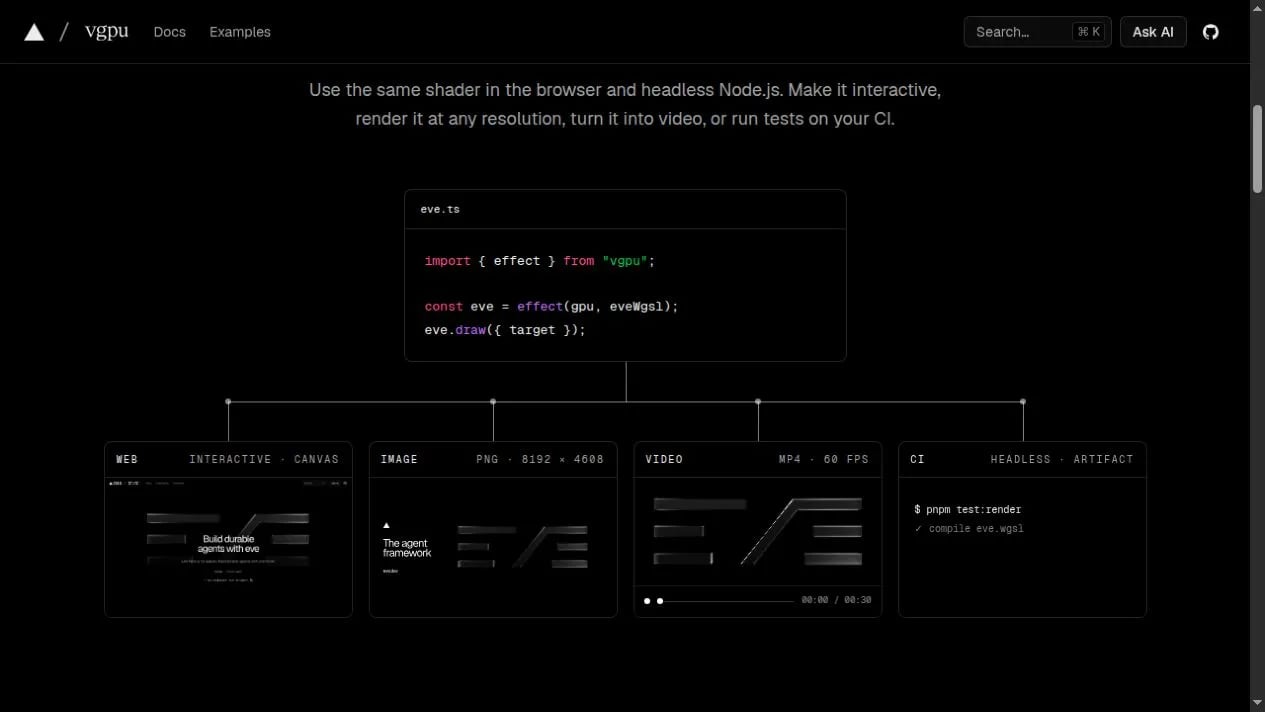
The central benefit is not simply producing attractive graphics. It is reusing the same shader logic. An effect can appear in an interactive canvas, render into a Node texture, become a high-resolution image, or be checked in CI. The vgpu/mock adapter supports deterministic tests without a physical GPU, while a Dawn-backed Node adapter produces actual pixels.
Modular WGSL
WGSL does not provide a TypeScript-style module system. vGPU adds imports and exports between .wgsl files, resolves dependency graphs at build time, reflects bindings, and removes unused declarations. Noise, color, sampling, and math functions can live in reusable modules instead of manually concatenated strings.
A controlled bundle budget
Vercel states that a complete fullscreen effect fits within a 25 KB gzip budget enforced in the project’s CI. This is a project target, not a promise that every scene will be 25 KB and not an independent benchmark against every engine. Textures, models, application code, and additional shaders still increase the delivered payload.
Rendering and compute without adopting a full engine
The public API includes drawing, compute, effects, frames, surfaces, targets, and buffer primitives. It covers more than a collection of animated backgrounds but remains lower-level and more explicit than Three.js or Babylon. That is helpful when a team wants to control the pipeline, and less helpful when it expects cameras, asset loaders, physics, PBR materials, and editors out of the box.
Agent-oriented tooling
Documentation, examples, WGSL validation, and runtime diagnostics are available through the CLI. The official gallery also exposes examples that tools and agents can inspect. An agent can query the precise API and validate a shader instead of relying on stale snippets from unrelated versions.
Quick example: a WebGPU effect with vGPU
The minimum setup installs the main package and the maintained WebGPU type definitions:
pnpm add vgpu
pnpm add -D @webgpu/types
Deploy Next.js and Node.js with full server control
Run your frontend, APIs, and Node.js processes on a VPS with root access, configurable resources, snapshots, and control over the production runtime.
TypeScript initializes one GPU context, connects it to a canvas, and executes the effect each frame:
import { clock, effect, frameLoop, init, surface } from "vgpu";
import waveShader from "./wave.wgsl";

const gpu = await init();
const output = surface(gpu, canvas, { dpr: [1, 2] });
const wave = effect(gpu, waveShader, { set: { speed: 2 } });
const time = clock(gpu);

frameLoop(gpu, (frame) => {
  wave.set({ time: time.time });
  frame.pass(output, wave);
});
The shader lives in a separate WGSL file. As the codebase grows, a noise function can be exported from another .wgsl module, imported by name, and removed from the compiled result when it is unused. A raw WebGPU project would need to build that organization itself.
Next.js and Turbopack integration
vGPU does not depend on Next.js, but the integration matters because WGSL files must pass through the build system. The @vgpu/wgsl documentation provides a rule for Next.js 15.5 or newer with Turbopack:
import type { NextConfig } from "next";

const nextConfig: NextConfig = {
  turbopack: {
    rules: {
      "*.wgsl": {
        loaders: ["@vgpu/wgsl/loader-webpack"],
        as: "*.js",
      },
    },
  },
};

export default nextConfig;
The canvas should initialize in a client component. Headless Node rendering is a separate process. Importing vgpu/node inside a serverless function does not automatically create GPU access; that runtime still needs the correct adapter and native dependencies.
What happens at build time
The @vgpu/wgsl toolchain resolves shader imports, preserves entry-point names, reflects bindings, and can minify the final WGSL. Reflection reduces duplication between layouts defined in the shader and their TypeScript counterparts. Teams should still run npx vgpu check in CI and test real hardware: successful compilation does not prove that a shader will hold 60 FPS on an integrated mobile GPU.
What does the official gallery demonstrate?
The official vGPU gallery goes well beyond a starter triangle. It includes a ray-marched black hole with HDR bloom, a Sierpiński fractal, glass transmission, interactive fluid, an FFT ocean with hundreds of thousands of particles, instancing, depth estimation, and an MNIST classifier. These examples demonstrate rendering and compute breadth, although they should not be treated as independent performance benchmarks.
vGPU vs Paper Shaders
They solve different problems. Paper Shaders is a collection of ready-to-use visual effects implemented with WebGL2 and available for JavaScript and React. Designers can configure a mesh gradient, noise, dithering, liquid glass, halftone, or another effect without designing a graphics pipeline from scratch.
vGPU uses WebGPU and WGSL; Paper Shaders uses WebGL2 and GLSL. A Paper shader therefore cannot be imported directly into vGPU. Moving one requires porting GLSL to WGSL and rebuilding uniforms, textures, and render passes. The same aesthetic can be recreated, but it is not a copy-and-paste migration.
| Criterion | vGPU | Paper Shaders |
|---|---|---|
| Purpose | Custom pipelines, effects, and compute | Preset visual effects |
| Backend | WebGPU / WGSL | WebGL2 / GLSL |
| First result | Requires authoring or adapting a shader | Component with configurable props |
| Compatibility | Restricted to WebGPU environments | Broader WebGL2 reach |
| Node/headless | A central use case | Not its primary target |
| Compute shaders | Yes | No; focused on visual effects |
| Best fit | Simulation, technical visualization, custom rendering, CI | Landing pages, portfolios, animated backgrounds |
Paper is better when the team wants creative speed, tuned presets, and wider device support. vGPU is better when it needs pipeline control, WebGPU compute, modular WGSL, or the same rendering logic in the browser and Node.
vGPU alternatives compared
| Option | Where it wins | Where vGPU wins | Use it when… |
|---|---|---|---|
| Raw WebGPU | Maximum control, no abstraction, immediate access to the specification | Less boilerplate, WGSL modules, reflection, Node, and testing mock | You are building an engine or need every low-level detail |
| Paper Shaders | Ready-made effects, simple visual API, WebGL2 reach | Compute, custom WGSL, multipass, and headless rendering | You want a polished visual treatment in a few lines |
| TypeGPU | Deep typing for buffers, bind groups, and TypeScript-authored shaders | A direct render API, modular WGSL files, integrated browser/Node workflow | Compile-time type safety and granular adoption are the priorities |
| Three.js WebGPURenderer | Large 3D ecosystem, scene graph, loaders, materials, postprocessing, WebGL2 fallback | Smaller surface for one focused effect or pipeline | You are building a 3D experience, configurator, or viewer |
| Babylon.js | Full engine, mature tooling, PBR, assets, broad compatibility | Smaller and more explicit for focused shaders or compute | You need a complete, stable 3D product stack |
| Babylon Lite | Tree-shakeable WebGPU 3D engine with scenes, cameras, and materials | Closer to the shader and oriented toward headless pixel rendering | You want a modern WebGPU-only 3D engine |
vGPU vs TypeGPU
This is the closest comparison. TypeGPU prioritizes end-to-end type safety: structures, buffers, and bind groups preserve information that raw WebGPU normally reduces to bytes. It can also turn TypeScript functions marked with 'use gpu' into WGSL and supports granular access to the underlying WebGPU resources.
vGPU begins with explicit WGSL and provides a compact layer for composing render work, loading modules, submitting frames, and repeating the workflow in Node. Choose TypeGPU when the team wants to author GPU functions in TypeScript and catch more mismatches at compile time. Choose vGPU when the team already thinks in WGSL and wants a short route from shader to canvas, image, video, or CI.
vGPU vs Three.js WebGPURenderer
Three.js WebGPURenderer uses WebGPU by default and can fall back to WebGL2 when WebGPU is unavailable. It also includes TSL, a node-based shading language that compiles to WGSL or GLSL. That compatibility and the large Three.js ecosystem are decisive advantages for 3D scenes.
vGPU avoids the scene graph and keeps frames and passes explicit. It is a better fit for a shader background, a 2D simulation, image processing, mathematical visualization, or a highly customized pipeline where a full engine would add unnecessary concepts.
vGPU vs Babylon.js and Babylon Lite
Babylon.js remains the mature choice for cameras, lights, materials, glTF importing, tooling, and broad compatibility. Babylon Lite is its newer WebGPU-only, modular, tree-shakeable sibling. It is philosophically closer to vGPU in bundle discipline but remains a 3D engine.
The useful question is whether the product needs a scene with entities, cameras, and materials, or a GPU pipeline. Babylon is stronger for the first; vGPU is stronger for the second. Babylon’s own documentation still recommends Babylon.js as the general production default while Lite fills feature gaps and stabilizes its API.
vGPU limitations and risks
- WebGPU is not Baseline yet. MDN marks it as limited availability and requires HTTPS. Detect support and provide an image, video, CSS, WebGL2, or another fallback.
- No automatic WebGL2 fallback. Three.js WebGPURenderer or a WebGL2 library such as Paper may reduce compatibility work for a broad audience.
- The project is young. Early versions imply a smaller community, fewer integrations, and potential API changes. Pin dependencies and isolate adoption behind an application module.
- Small does not mean automatically fast. Performance depends on shader complexity, resolution, memory, passes, formats, CPU↔GPU reads, and the visitor’s hardware.
- Node does not turn Vercel Functions into GPU servers. Headless rendering needs a compatible runtime. The mock validates deterministic logic but does not replace real rendering and performance tests.
- WGSL knowledge is still required. vGPU reduces infrastructure, not the need to understand buffers, bindings, pipelines, textures, synchronization, and numeric precision.
How to evaluate vGPU before production
- Define a fair reference: compare the same visual output in vGPU, the current implementation, and the fallback.
- Measure frame time: record medians and percentiles instead of eyeballing FPS for a few seconds.
- Test device-pixel ratios: doubling resolution multiplies pixel work; cap DPR when the visual difference is negligible.
- Inspect memory and transfers: GPU-to-CPU reads can stall the pipeline. Keep data on the GPU when possible.
- Handle device loss: drivers, memory pressure, and suspension can invalidate a device. Recover or show a fallback.
- Test production builds: verify Turbopack, webpack, or Vite includes shaders and preserves entry points.
- Separate deterministic and visual tests: use the mock for logic, and headless snapshots or hardware for pixel validation.
Deploying on a VPS: what it solves and what it does not
A Next.js application that displays a vGPU canvas can be deployed on a VPS like another Node.js project: persistent process, reverse proxy, HTTPS, environment variables, and logs under the team’s control. This helps when the application also includes APIs, authentication, background jobs, or asset generation.
A conventional VPS does not add a GPU to the visitor’s browser and does not guarantee accelerated headless rendering. Server-side GPU work needs compatible hardware and drivers; CI jobs that do not need real pixels can use the mock adapter. If you need control over the Next.js and Node runtime, review Teramont VPS Hosting and size CPU, memory, and storage for the application without confusing those resources with a dedicated GPU.
Which option should you choose?
- Landing page with a gradient, grain, or glass effect today: Paper Shaders.
- Custom effect, simulation, particles, or image processing: vGPU.
- TypeScript-authored shaders with exhaustive typing: TypeGPU.
- Configurator, game, or 3D viewer with many assets: Three.js or Babylon.js.
- Modern, WebGPU-only, tree-shakeable 3D engine: evaluate Babylon Lite.
- Internal engine or low-level research: raw WebGPU.
vGPU occupies a useful space between raw WebGPU and a full 3D engine. Its meaningful differentiator is not only the Vercel name or the agent positioning; it is the combination of modular WGSL, headless rendering, and one API for production and tests.
Frequently asked questions
Does vGPU provide cloud GPUs?
No. It is a TypeScript library for WebGPU. It does not rent hardware or replace a cloud GPU provider.
Can I use vGPU with Next.js?
Yes. Its WGSL package provides loader integration for Turbopack/webpack and Vite. Initialize the canvas on the client; Node headless rendering is a separate workflow.
Does vGPU replace Three.js?
Not generally. vGPU fits focused pipelines and shaders. Three.js adds a scene graph, cameras, loaders, materials, and a much larger 3D ecosystem.
Can Paper shaders run in vGPU?
Not directly. Paper Shaders uses WebGL2 and GLSL, while vGPU uses WebGPU and WGSL. The shader and its resources must be ported.
Does vGPU work in every browser?
No. It depends on WebGPU, which still has availability gaps. Use HTTPS, capability detection, and a fallback that matches the audience.
Is vGPU free?
The library is open source under the MIT license. Development, hosting, bandwidth, and any hardware used for headless rendering still have costs.
Conclusion
vGPU is a promising addition to the WebGPU ecosystem: compact, modular, and designed to keep a shader from being trapped in one canvas. Its strongest use case appears when a team needs custom rendering or compute, wants to test it in CI, and values machine-readable documentation and examples.
It is not the automatic choice for every site. Paper Shaders delivers visual results faster; Three.js and Babylon solve far more of a full 3D application; TypeGPU provides a deeper type system; raw WebGPU preserves maximum control. For controlled new projects already targeting WebGPU, vGPU deserves a serious technical pilot.