



NGINX is usually the better choice when you need maximum control, static-file serving, caching, or the highest performance from a stable proxy route. Traefik is usually better when services change frequently and you want Docker, Kubernetes, or another provider to update routes automatically. Neither wins every scenario: NGINX is a multipurpose web server and proxy; Traefik is a cloud-native application proxy designed around dynamic service discovery.
Traefik—pronounced roughly like “traffic”—is written primarily in Go. NGINX is written primarily in C and uses an event-driven master-and-worker architecture. That difference matters, but it should not make the decision by itself. The useful question is which work you need to automate and which traffic features you actually require.
| If your priority is… | Starting point | Why |
|---|---|---|
| A VPS with WordPress, PHP-FPM, or static files | NGINX | Web server, FastCGI, cache, and proxy in one component |
| Docker Compose with services appearing and disappearing | Traefik | Label-based discovery and dynamic route updates |
| Kubernetes and Gateway API | It depends | Both have implementations; compare conformance, policies, and operating model |
| Raw performance with a stable route | NGINX | It delivered higher throughput and lower latency in our synthetic lab |
| Automatic HTTPS for many microservices | Traefik | ACME and certificates integrate with routers and providers |
| HTTP caching at the proxy | NGINX | Built-in content cache and buffering controls |
| Declarative configuration reviewed in Git | Both | NGINX uses explicit files; Traefik also supports a file provider |
What NGINX and Traefik are
NGINX: web server, proxy, and cache
NGINX Open Source can serve files, terminate TLS, reverse proxy requests, balance HTTP and TCP/UDP traffic, cache upstream responses, and communicate with FastCGI, uWSGI, and SCGI. Its configuration normally lives in files that an operator validates and reloads. The master process checks the new configuration, starts new workers, and gracefully retires the old ones; if the configuration cannot be applied, NGINX keeps the previous version.
This makes it particularly strong when topology changes slowly, you need fine control over buffers and caching, or the same layer must serve static content and proxy an application.
Traefik: a cloud-native application proxy
Traefik Proxy watches infrastructure providers—such as Docker, Kubernetes, Consul, or files—and builds routing configuration from them. It is distributed as a single Go binary and an official container image. Its model separates install configuration, which defines entrypoints and providers, from dynamic routing configuration containing routers, middlewares, services, and TLS.
Its advantage is not simply “being written in Go.” It turns orchestrator changes into route changes without requiring a person to regenerate and reload each file. For teams operating many small services, that reduction in repetitive work may be worth more than a microsecond-level difference.
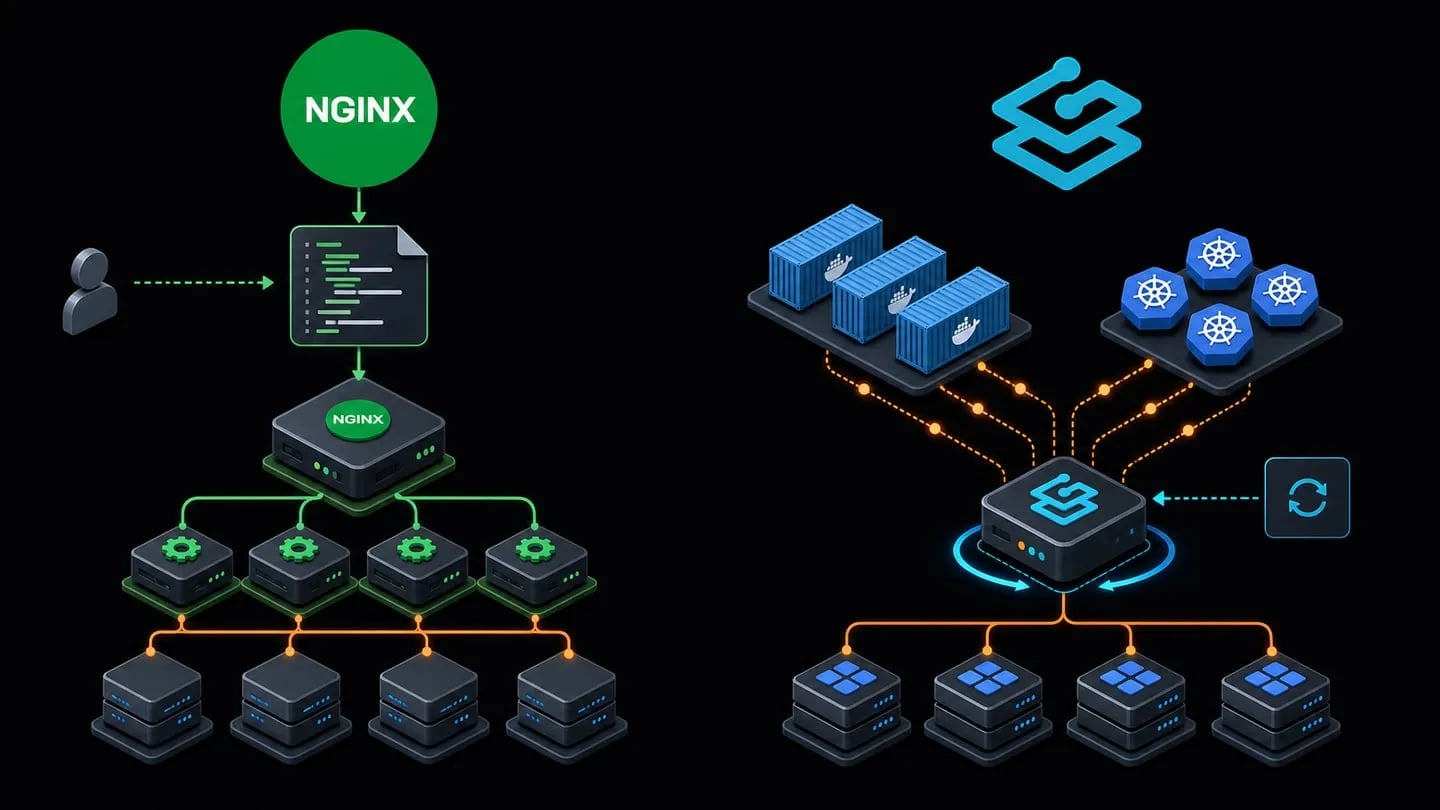
NGINX vs Traefik: differences that change an architecture
| Area | NGINX Open Source | Traefik Proxy |
|---|---|---|
| Primary role | Web server, reverse proxy, cache, and load balancer | Cloud-native application proxy and load balancer |
| Primary language | C | Go |
| Configuration | Explicit files and validated reloads | Dynamic providers, files, CLI, or environment variables |
| Service discovery | Not the center of NGINX OSS; commonly needs DNS, templates, a controller, or external automation | Native through Docker, Kubernetes, and other providers |
| Static files | Yes | Not a general-purpose file server; normally proxies another service |
| HTTP cache | Yes, with cache and buffering controls | No equivalent core HTTP content cache |
| Automatic TLS | Possible through external tools or complementary controllers/products | Integrated ACME certificate resolvers |
| Dashboard | Not part of basic NGINX OSS | Integrated dashboard and API; they must be protected |
| Observability | Logs and metrics through modules/tools; scope depends on distribution | Integrated logs, access logs, metrics, and tracing, including OpenTelemetry |
| Kubernetes | NGINX Gateway Fabric and specific controllers | Ingress, CRD, and Gateway API providers |
| Typical fit | VPS, WordPress, monoliths, static content, cache, and fine tuning | Docker, microservices, frequent deployments, and dynamic routing |
Configuration and discovery: the most important difference
With NGINX, the file is the source of truth. The usual workflow is to edit, validate with nginx -t, and reload. That friction is minor on a VPS with three applications and may be beneficial: each change is explicit, reviewable, and independent of access to an orchestrator API.
upstream app_backend {
    server 10.0.0.11:3000;
    server 10.0.0.12:3000;
    keepalive 32;
}

server {
    listen 443 ssl;
    server_name app.example.com;

    location / {
        proxy_http_version 1.1;
        proxy_set_header Connection "";
        proxy_set_header Host $host;
        proxy_set_header X-Forwarded-Proto $scheme;
        proxy_pass http://app_backend;
    }
}
Validate before applying a change:
Deploy the proxy that fits your stack
Choose a VPS with clear resources for NGINX, Traefik, Docker, and the observability your application needs.

sudo nginx -t
sudo systemctl reload nginx
Traefik can derive the same intent from Docker labels. When a container is created, replaced, or removed, the provider recalculates routes. This example disables automatic exposure so a service is published only with explicit consent:
services:
  traefik:
    image: traefik:v3.7
    command:
      - --entrypoints.websecure.address=:443
      - --providers.docker=true
      - --providers.docker.exposedbydefault=false
    ports:
      - "443:443"
    volumes:
      - /var/run/docker.sock:/var/run/docker.sock

  app:
    image: example/app:1.0
    labels:
      - traefik.enable=true
      - traefik.http.routers.app.rule=Host(`app.example.com`)
      - traefik.http.routers.app.entrypoints=websecure
      - traefik.http.services.app.loadbalancer.server.port=3000
Security warning: access to the Docker socket provides sensitive Docker API access. A read-only bind mount does not create per-operation authorization for a Unix socket. In production, limit access through a socket proxy or protected endpoint, run Traefik with minimum privileges, and keep exposedByDefault=false.
Performance: what we actually measured
Online results are not interchangeable. One test may compare static files served directly by NGINX with Traefik proxying another server; another may test complete Gateway API controllers; another may enable TLS, logs, or middlewares on only one side. Any of those differences can dominate the result.
To provide a reproducible reference, we ran a local lab on August 29, 2026. It does not simulate an entire production system; it isolates the data plane of a reverse proxy with one fixed route.
- NGINX 1.30.4 and Traefik 3.7.12, with Traefik built using Go 1.26.7.
- Official containers,
linux/amd64, limited to 2 CPUs and 256 MB per proxy. - The same NGINX backend, the same approximately 1 KB JSON file, and the same Docker network.
- Plain HTTP, access logs disabled, 100 k6 virtual users, and 30 seconds per run.
- Three runs per proxy; the table reports the median for each metric.
| Proxy | Requests/s | p95 latency | p99 latency | Errors |
|---|---|---|---|---|
| NGINX 1.30.4 | 53,359 | 2.47 ms | 3.40 ms | 0% |
| Traefik 3.7.12 | 37,705 | 5.74 ms | 8.01 ms | 0% |
In this scenario, NGINX processed approximately 41.5% more requests per second than Traefik and delivered lower tail latency. That is useful evidence for a stable, high-volume route; it does not prove that NGINX will be 41.5% faster in your application.
The lab did not measure TLS, HTTP/2 or HTTP/3, compression, cache, WebSockets, gRPC, authentication, rate limiting, observability, multiple upstreams, or configuration changes. It also assigns no value to the operator time Traefik saves through discovery. The public Gateway API Bench repository produces different results under Kubernetes and explicitly warns that dataplane performance depends on thousands of variables. The correct takeaway is: repeat the test with your protocols, payloads, middlewares, CPU, topology, and deployment pattern.
HTTPS and certificates
NGINX terminates TLS reliably and gives detailed control over protocols and ciphers, but NGINX OSS does not automatically turn every new Docker hostname into a Let's Encrypt certificate. It is commonly paired with Certbot, scripts, a panel, or a Kubernetes controller.
Traefik integrates ACME through certificate resolvers. Each HTTPS router references a resolver, and Traefik obtains and renews certificates from domain rules. Persist ACME storage and use the staging server during testing to avoid issuance limits. With Kubernetes Gateway API, Traefik's own documentation identifies cases where cert-manager and Secrets should be used instead of built-in ACME.
Caching, static content, and WordPress
This is an easy difference to miss. NGINX can directly serve CSS, JavaScript, images, and downloads, communicate with PHP-FPM, and cache upstream responses. For WordPress, a traditional VPS, or an application where the proxy is also the web server, NGINX combines more required functions in one component.
Traefik routes traffic. It does not replace a file server or offer an HTTP content cache comparable to NGINX proxy_cache. Explicit configuration also makes per-layer limits easier to locate, as shown in our guide to the NGINX 413 error. You can place Traefik in front of NGINX, Caddy, an application, or a CDN, but the extra layer should have a clear purpose. For one WordPress site and two virtual hosts, it may add complexity without enough benefit.
Docker and operational security
Traefik fits Docker naturally because it reads labels and detects ports and networks. That advantage also creates a trust boundary: the proxy needs to query the Docker API. A dashboard exposed through api.insecure=true is for development only; production access must be authenticated and routed securely.
NGINX can run in Docker without access to the socket. In return, a person or tool must maintain its upstream list. Templates, controllers, or external discovery can automate it, but at that point you are building part of the control plane that Traefik already includes.
Kubernetes: do not compare only “NGINX” with “Traefik”
In Kubernetes, a product name does not identify the complete architecture. Compare specific implementations, versions, Gateway API or Ingress, CRDs, policies, control-plane and data-plane separation, and features available in the chosen edition.
Traefik provides Kubernetes Ingress, CRD, and Gateway API providers. NGINX Gateway Fabric implements Gateway API with NGINX as its data plane and a control plane watching cluster resources. A benchmark of NGINX OSS using a local file therefore does not predict NGINX Gateway Fabric automatically, and a Traefik file-provider test does not represent every Kubernetes event.
Load balancing, middlewares, and observability
Both support load balancing and advanced routing, but express capabilities differently. NGINX organizes upstreams, locations, and modules, with methods including round robin, least connections, hash, and random. Traefik uses routers, services, and middlewares to chain redirects, headers, authentication, retries, or circuit breakers.
Traefik integrates logs, access logs, metrics, and tracing and can control observability per router. NGINX has mature access and error logs and integrates with metrics and tracing through modules, agents, or complementary products. If your platform already standardizes on OpenTelemetry and deploys dozens of services, Traefik reduces repeated configuration. If you already have a mature NGINX observability stack, migrating only for the dashboard rarely pays off.

When to choose NGINX
- You operate one or more stable sites on a VPS.
- You need static-file serving, FastCGI, or HTTP caching.
- You want detailed tuning of buffers, timeouts, connections, and upstream behavior.
- Dataplane latency and throughput are priorities and routes change infrequently.
- You prefer explicit configuration that is validated and reviewed before reload.
- You do not want the proxy to access the Docker API.
When to choose Traefik
- Your platform starts with Docker, Kubernetes, Nomad, or another supported provider.
- Services change frequently and manual files have become a source of errors.
- You want routing, TLS, and middlewares defined alongside each service deployment.
- You need dashboards, metrics, and tracing with less initial assembly.
- The operational cost of registering services matters more than raw proxy throughput.
- Your team understands and protects provider credentials and management APIs.
When using both makes sense
A valid architecture can use Traefik to discover and route services while an internal NGINX serves static content, caches responses, or connects to PHP-FPM. Do not add the second hop for fashion: every layer adds configuration, metrics, and failure modes. Use both only when each layer has a measurable responsibility.
Our honest opinion: which one is better?
For a traditional VPS, WordPress, a monolithic application, or static content, we would choose NGINX. It offers more web-server functions, its configuration is predictable, and it delivered higher performance in our fixed-route lab.
For a Docker or Kubernetes microservices platform with continuous deployments, we would choose Traefik when the team wants routing to follow the orchestrator. Its value appears when it eliminates manual changes, not when the comparison is reduced to requests per second.
On Kubernetes, evaluate Traefik and NGINX Gateway Fabric as concrete implementations alongside other options, using the required Gateway API features, policies, and a load test of your application. The best tool is the one that reduces operational risk while meeting latency, security, and recovery objectives.
Frequently asked questions
Is Traefik written in Go?
Yes. The official repository identifies Go as its primary language, and the distribution ships as a compiled binary.
Does Traefik completely replace NGINX?
Not always. It can replace NGINX as a reverse proxy or ingress, but it does not provide the same role as a static-file server, FastCGI endpoint, and HTTP cache.
Can NGINX discover containers automatically?
Docker discovery is not the core model of NGINX OSS. You can combine it with DNS, templates, controllers, or external automation. NGINX Gateway Fabric adds a dedicated control plane for Kubernetes Gateway API.
Which one uses fewer resources?
It depends on version, workload, protocols, modules, and observability. Do not rely on one isolated number; measure CPU, memory, p95/p99 latency, and errors under your actual configuration.
Which is better for Docker Compose?
Traefik usually reduces work because it reads labels and updates routes. NGINX remains reasonable for a small number of stable services or when you already generate and validate its configuration automatically.
Which is better for WordPress?
NGINX usually fits better because it can serve static files, connect to PHP-FPM, and cache responses. Traefik can sit in front when WordPress is part of a larger container platform.
Sources and reproducibility
- NGINX Open Source features and architecture
- NGINX graceful configuration reload
- NGINX HTTP proxy and cache
- Traefik install and dynamic routing configuration
- Traefik Docker provider
- Traefik ACME and Let's Encrypt
- NGINX Gateway Fabric
- Gateway API Bench methodology and public results
The laboratory configuration and load files were retained to reproduce the test. Last technical review: August 29, 2026.