


Laravel published critical advisory GHSA-f9x3-7vq9-cph6 for an authentication bypass in TokenGuard. Your priority is to check how your API authenticates requests and which version is deployed—not assume every Laravel application is exposed.
Sources checked on October 19, 2026. The advisory lists CVSS 4.0 severity 9.2 and no assigned CVE. It describes user impersonation without a valid token under certain MySQL/MariaDB configurations. It provides no victim count. Official Laravel advisory.
What the flaw means for your application
A guard determines how a request's user is identified. A guard name such as api does not necessarily identify its implementation: check its driver. Laravel distinguishes session authentication from the Sanctum and Passport API solutions. These are not interchangeable names for its built-in TokenGuard. Authentication documentation.
The problem involves accepting an inappropriate credential type during an authentication lookup. A query may associate the request with the wrong account. This does not automatically give an attacker root access to the server or open every application route.
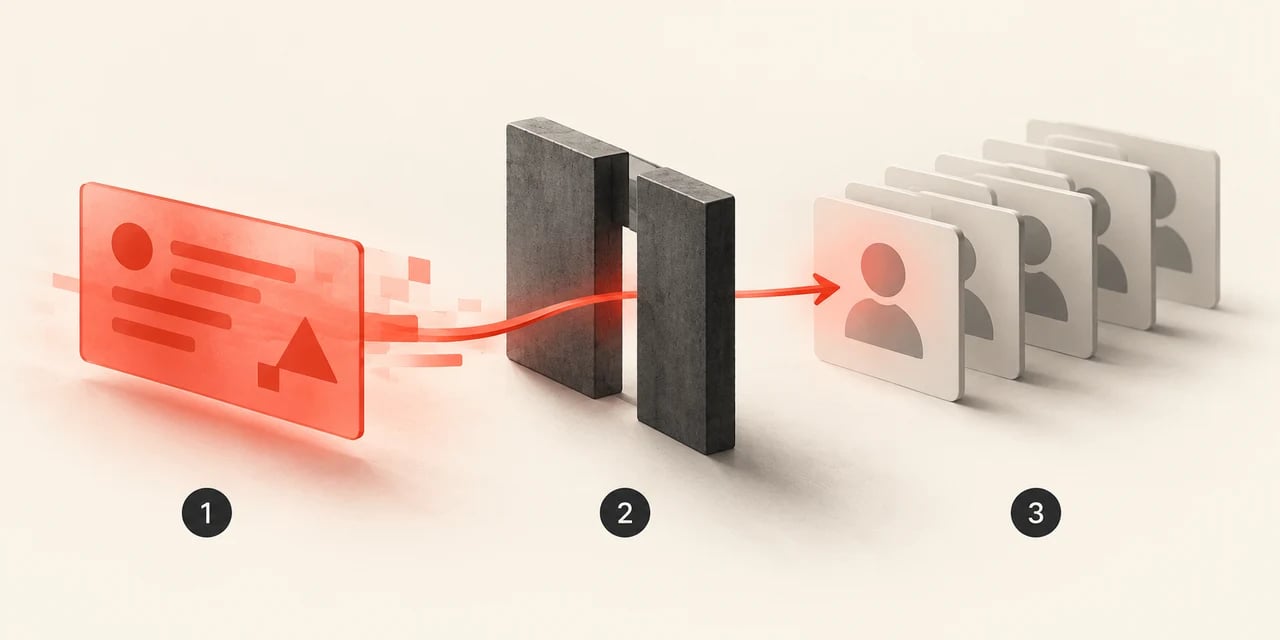
AI-generated illustration, not evidence of an attack. 1: authentication input. 2: insufficient validation. 3: incorrectly associated identity.
Hypothetical example: a billing API mistakenly identifies a request as belonging to another customer. A route that can read that customer's invoices could expose them; one that can modify them could cause greater harm. The available operations and permissions determine the consequences, not simply the presence of Laravel.
Fixed versions: Laravel 12.68.0 and 13.29.0
| Branch | Versions before the fix | Listed fixed minimum |
|---|---|---|
| Laravel 12.x | 12.x before 12.68.0 | 12.68.0 |
| Laravel 13.x | 13.x before 13.29.0 | 13.29.0 |
These are minimums for this advisory, not a recommendation to stop updating. No fixed version for earlier branches is provided here. Do not assume they are protected or install a new major version without checking compatibility.
Advisory publication is not the patch release date. The release pages for Laravel 12.68.0 and Laravel 13.29.0 show August 25 releases. An updated application may therefore already include the correction before its owner sees this alert.
What we checked in the official code
We inspected TokenGuard.php in both listed versions. In user(), the lookup requires a non-empty string token; validate() also rejects credentials failing that condition. This is a type check before querying the user provider, not a password change or operating-system patch. 12.68.0 source · 13.29.0 source.
Method and limits: static inspection of those two files on October 19. We did not execute an exploit, test database configurations or audit customer applications.
How to check whether action is needed
Start in the correct project: one VPS can host several applications with different dependencies.
1. Compare installed and locked versions
composer show laravel/framework
composer show laravel/framework --locked
composer audit --locked
show reports installed packages; --locked reads composer.lock. Investigate deployment differences. audit helps find known advisories, but a clean result does not examine your routes or guarantee the absence of vulnerabilities. Composer command reference.
2. Inspect the effective guard and routes
Open config/auth.php and look for guards whose driver is token. Check custom registrations and the effective deployed configuration too; an edited file may differ from cached configuration.
Run your Laravel project on a TERAMONT VPS
Choose resources for your application and plan its deployments. Keeping Laravel and its dependencies updated remains part of managing your project.

php artisan route:list -vv
Identify the middleware protecting each endpoint and resolve its guard. auth:api alone does not prove TokenGuard is used, and neither does an /api URL prefix. The detailed listing expands middleware groups. Do not publish output containing internal routes. Laravel's route listing.
3. Make a decision, not an automatic assumption
- Version before the fix and token driver: prioritize updating and review the database configuration with the responsible team.
- Only Sanctum, Passport or sessions on reviewed routes: you have not identified the code path described here. Check for a token guard on secondary endpoints.
- Fixed version in the repository but deployment unconfirmed: inspect every instance serving traffic; the lockfile alone does not prove what is running.
How to update with a verifiable deployment
Prepare a recoverable backup and a working branch first. In development or staging, review the constraints in composer.json and simulate the update:
composer update laravel/framework --with-all-dependencies --dry-run
Confirm the result reaches your branch's fixed minimum. The dependency option may update other packages, so review the proposed set. Resolve compatibility conflicts rather than disabling security checks or ignoring PHP requirements to force installation.
Once reviewed, apply it in that environment and run the project's tests:
composer update laravel/framework --with-all-dependencies
php artisan test
Save and review the composer.lock change. Deploy that tested artifact through your normal process. Laravel's documentation says long-running processes must be reloaded to use new code: check Octane and workers in particular, alongside your environment's OPcache policy. Rebuild cached configuration if you changed it. Official deployment guide.
Recommended acceptance checks
In staging, using test accounts and read-only operations, verify that missing credentials and invalid tokens are rejected, a valid token retains the expected identity, and users cannot access other users' resources. Add cases rejecting unexpected credential types. These are proposed tests, not results we claim to have obtained in your application.
What to do while updating, or if you suspect an incident
If immediate deployment is impossible, consider temporarily restricting affected endpoints to a private network or disabling them, assessing the impact on customers and integrations. This is operational containment, not an equivalent official fix. Token rotation or password changes cannot replace repairing an authentication check.
Preserve logs and review sensitive actions, identities and unusual access patterns. Do not start logging full tokens to investigate. If impersonation is confirmed, review the actions performed and revoke compromised credentials or sessions under your response plan. The absence of suspicious logs does not prove there was never unauthorized access.
On a VPS, who applies this patch?
The component to update here is Laravel inside the application. Updating Debian, PHP or the host kernel does not replace that work. On a self-managed VPS, the project administrator is responsible; if you purchased application management, request confirmation of deployment and testing.
You can host your project on TERAMONT VPS Hosting, but switching providers does not automatically fix application dependencies. Choose resources for your workload and maintain an update-and-verification routine. If you are getting started, read what a VPS is and what responsibilities come with it.